News, examples, tips, ideas and plans.
Thoughts around ORM, .NET and SQL databases.

Thursday, June 14, 2012

DataObjects.Net 4.5.3 RC 3

Today we are publishing the next release candidate for the upcoming version of DataObjects.Net.

Changes

Changes in 4.5.3 RC3:

[main] Finally, change log is included in distribution =)
[main] RemoveFieldHint, ChangeFieldTypeHint are now correctly handled for Structure fields
[main] Correctly skip full-text indexes if storage does not support them
[mysql] Fixed index direction support for MySQL
[mysql] Improved translation of DateTime.Date for MySQL
[mysql] Fixed incorrect translation of Math.Truncate and Decimal.Truncate for MySQL
[mysql] Fixed incorrect translation of String.IndexOf for MySQL
[mysql] Fixed mapping of Single and Double types for MySQL
[mysql] Fixed schema extraction with case-sensitive collation for MySQL
[postgresql] Hex format for byte array literals is used for PostgreSQL 9.0 and later

Changes in 4.5.3 RC2 (wasn't officially announced):

[main] Validation now works in ClientProfile
[main] Fixed various errors with certian EntitySet usage scenarios in ClientProfile
[main] Fixed "Scope can't be disposed" error under certain query enumeration scenarios

Download

Saturday, May 12, 2012

DataObjects.Net 4.5.3 RC and 4.4.3 RC3

DataObjects.Net 4.5.3 RC and 4.4.3 RC3 are available.

Both contain the same fixes that are listed below:
  • Fixed index duplication under certain scenarios (see this for details)
  • Fixed error about duplicate index name under certain scenarios (see this for details)
  • Added SessionOptions.SuppressRollbackExceptions

Rollback exceptions suppression

Option SessionOptions.SuppressRollbackExceptions tells DataObjects.Net to catch (and log) any exception that occurred during rollback. Rollback typically occurs when some exception is already thrown. So any exception during rollback will cause original exception to be lost. New option could be used to prevent such behaviour.

Migration path

No special migration is required.

Thursday, May 10, 2012

DataObjects.Net 4.5.2

DataObjects.Net 4.5.2 is released.

This is tiny update that fixes database schema incompatibility between 4.4.x and 4.5.x versions.

If you are migrating from 4.4 this is highly recommended update.

You can download installer and zip at downloads area.  NuGet packages are available as well.

Migration path

No special migration required.

Saturday, May 05, 2012

DataObjects.Net 4.5.1 is out

We are releasing DataObjects.Net 4.5.1. This is minor update, it contains changes, described in details in the previous announcements:
There are also small fixes in this version:
  • Fixed bug with NullReferenceException in rare cases during struct materialization
  • Added DomainConfiguration.SchemaSyncExceptionFormat property for precise control over the correspondent exception format
DataObjects.Net 4.5.1 is available for download from the website and as NuGet packages.

Wednesday, May 02, 2012

DataObjects.Net 4.5.1 RC2

DataObjects.Net 4.5.1 RC2 is available.

The following improvements are included:
  • Fixed missing associations under certain conditions (like in 4.4.3 RC2)
  • Fixed incorrect OnOwnerRemove=Clear for non-paired associations (like in 4.4.3 RC2)
  • NuGet package for Firebird provider is now available
  • NuGet package for PostgreSQL provider is now available with some work around.
  • Fixed LINQ translator regression in DateTime operations that occurred in 4.5.1 RC
  • More friendly names are displayed for NuGet packages (i.e. DataObjects.Net instead of Xtensive.Orm for main package)
Binaries and installer could be downloaded here. NuGet packages are available as well.

Workaround for PostgreSQL provider package

NuGet package for PostgreSQL is now available as well. However it does not work out of the box. DataObjects.Net is built against Npgsql 2.0.11.92, however only 2.0.11.0 is available at NuGet.

NuGet package manager is aware of such situations and tries to make a work around by adding binding redirection where required.

If you add  Xtensive.Orm.PostgreSql package to your project, you might see binding redirection is added to app.config/web.config (I've added line breaks to fit into blog width)

<assemblyBinding xmlns="urn:schemas-microsoft-com:asm.v1">
  <dependentAssembly>
    <assemblyIdentity
      name="Npgsql"
      publicKeyToken="5d8b90d52f46fda7"
      culture="neutral" />
    <bindingRedirect
      oldVersion="0.0.0.0-2.0.11.0"
      newVersion="2.0.11.0" />
  </dependentAssembly>
</assemblyBinding>

This does not work unfortunately, because Xtensive.Orm.PostgreSql assembly depends on a version that is newer than available version. It seems that NuGet tools only consider the reverse scenario, where dependent assembly is built against older version.

To solve this issue, you'll need to change old version range to include newer versions as well:

<assemblyBinding xmlns="urn:schemas-microsoft-com:asm.v1">
  <dependentAssembly>
    <assemblyIdentity
      name="Npgsql"
      publicKeyToken="5d8b90d52f46fda7"
      culture="neutral" />
    <bindingRedirect
      oldVersion="0.0.0.0-2.0.11.9999"
      newVersion="2.0.11.0" />
  </dependentAssembly>
</assemblyBinding>

Migration path

No special migration is required. This version is source and binary compatible with 4.5.0 and 4.5.1 RC.

DataObjects.Net 4.4.3 RC2

Even DO.Net 4.5 is available we continue to supply fixes for previous version.

This update has 5 improvements over DO.Net 4.4.3 RC:
  • Fixed double release of resources in Session.Dispose()
  • PostSharp is updated to version 2.1.6.13
  • Fixed incorrect OnOwnerRemove=OnRemoveAction.Clear for non-paired associations
  • Fixed NullReferenceException that might occur when parsing error from SQL Server
  • Fixed missing associations under certain conditions

Migration path

This is bug-fix only release. It does not require source code changes. Due to upgraded PostSharp it is recommended to recompile assemblies with persistent types.

Binaries .rar can be downloaded here.

Monday, April 23, 2012

DataObjects.Net 4.5.1 RC

DataObjects.Net 4.5.1 Release Candidate is available.

This update includes features that we didn't have time to implement in 4.5.0 as well as bug fixes.
Installer and .zip can be downloaded here.

NuGet packaging

DataObjects.Net got official NuGet packages.

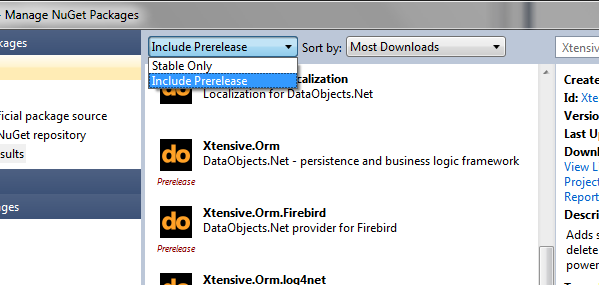
Currently they are pre-release in terms of NuGet packaging. This means they won't be shown by default. To install such package you'll need to change default package filter:


To get main library (Xtensive.Orm) you'll to need install Xtensive.Orm package from package browser. Or if you prefer to use package manager console:


 PM> Install-Package Xtensive.Orm -IncludePrerelease


Each storage provider has its own package, that depends on main library.
Here are the names of all available packages:
  • Xtensive.Orm - main library
  • Xtensive.Orm.Firebird - provider for Firebird (incorrect dependency, temporary removed from listing)
  • Xtensive.Orm.MySql - provider for MySQL
  • Xtensive.Orm.SqlServerCe - provider SQL Server Compact (3.5 only)
  • Xtensive.Orm.Oracle - provider for Oracle
  • Xtensive.Orm.log4net - logging provider for log4net
For most packages all dependencies will be installed from NuGet automatically, exceptions are SQL Server Compact and Oracle providers. PostgreSQL provider currently is not available due to old assembly version of Npgsql library in corresponding package. This is to be solved in future updates.

Portable mode for license manager

License manager now supports so-called "portable" mode.

By default license manager stores license files in %ALLUSERSPROFILE%\DataObjects.Net folder.
For recent Windows versions it is typically C:\ProgramData\DataObjects.Net.

Sometimes it is desirable to have license files somewhere relative to your sources. Now such layout could be accomplished with ease.

Suppose you have DataObjects.Net in a subfolder of your project. For example let's say you have DO.Net in C:\Projects\MyProject\Libraries\DO.Net.

To activate portable mode you need to create folder with name Licenses on the same level as Tools and Libs and DataObjects.Net.targets. So in our example it should be C:\Projects\MyProject\Libraries\DO.Net\Licenses.

After this folder is created license manager will automatically read and write licenses in that folder.

No hardware licenses for Ultimate customers

Previous versions of DO.Net required you to have hardware license key for each computer. But if you have Ultimate subscription you are allowed to run it on unlimited number of machines. Hardware license key is however still were required.

This is no longer the case since 4.5.1. If you have valid license key for Ultimate edition no hardware license key is required. Just install company license key and you are ready to rock with DO.Net.

Bug fixes

  • Fixed complex indexes extraction in Oracle provider
  • Fixed translation of TimeSpan.Ticks property for Oracle and PostgreSQL
  • Correctly install templates for non-English Visual Studio

Migration path

This is minor update, no source code changes or recompilation required.
Installer will automatically uninstall any existing DataObjects.Net 4.5.x.
If you want to play with 4.5.1 RC and keep your 4.5.0 installation it's better to use .zip package instead.

Friday, April 13, 2012

DataObjects.Net 4.5 RTM and Big Spring Sale

DataObjects.Net 4.5 RTM

Today we are proudly releasing the long awaited DataObjects.Net 4.5 which includes lots of exciting features and updates. The major features are:
  • Provider for MySQL
  • Provider for Firebird
  • Provider for JustOneDB
  • LINQPad driver
  • DataObjects.Net Extensions (Security layer, Bulk operations, Reprocessible tasks)
  • PostgreSQL 9.1 support
  • SQL Server 2012 support
  • Ultra-fast topological sorter
  • Decreased memory consumption
All of them were described in detail in these posts:
DataObjects.Net 4.5 is waiting for you on our downloads page.

The Big Spring Sale

Due to the DataObjects.Net 4.5 release we are glad to announce that the Big Spring Sale has started on the 13-th of April and will last till the end of the month. During this time you get 50% off any edition of DataObjects.Net. To apply this 50% special to your order, just enter DO45PROMO coupon code at the product checkout page. Save up to 1250 euros!

Should you have any questions, please email to sales@dataobjects.net.

Tuesday, April 10, 2012

DataObjects.Net 4.5 RC 3

Next release candidate of DataObjects.Net 4.5 is available.

It contains various fixes and improvements since previous release candidate:
  • Fixed name of logger used to log SQL statement (compatibility issue)
  • Fixed double release of resources in Session.Dispose()
  • ProjectTool correctly displays exception that occurred during conversion
  • PostSharp is updated to version 2.1.6.13
  • Firebird provider for ADO.NET is updated to version 2.7.5.0
As always you can get release at download page.

Tuesday, April 03, 2012

DataObjects.Net 4.5 RC 2

This is Release Candidate of the upcoming DataObjects.Net 4.5 with a bunch of quick fixes.

Changes in this release

  • Minor fix in association building and processing
  • QueryBuilder: correctly start transaction before creating command
  • Updated version of Project tool

Project tool

Here is how it looks like now:
DataObjects.Net Project Tool
Starting from version 4.5 Project tool can produce slightly different set of upgrade actions depending on whether a project contains persistent types or not and whether DataObjects.Net is installed on computer or resides somewhere inside project structure.
  1. If a project contains persistent types, it must be processed by PostSharp so persistent aspects are correctly applied to persistent types. This require the presence of the corresponding Import directive inside project file.
    <Import Project="%Path to DataObjects.Net.targets%" />
    Accordingly, if the project doesn't contain entities, there is no need in that directive. Although it is not harmful, it might slow down compilation.

  2. If DataObjects.Net is installed
    • References to DataObjects.Net components should not include HintPath as installer registers %DataObjects.Net installation path% in AssemblyFoldersEx, so they are found automatically by MSBuild infrastructure.
    • DataObjects.Net.targets is stored to standard MSBuild Extensions folder, so it can be referenced by absolute path, e.g.
      <Import Project="$(MSBuildExtensionsPath)\DataObjects.Net\v4.5\DataObjects.Net.targets" />
  3. If DataObjects.Net is NOT installed
    • References to DataObjects.Net components must include HintPath.
    • Path to DataObjects.Net.targets can be made relative to the project, e.g.
      <Import Project="Lib\DataObjects.Net\DataObjects.Net.targets" />

Where to download

DataObjects.Net 4.5 can be downloaded from the official website.