Microsofties admitted that some noticeable performance problems are possible while working with MS SQL Server via ADO.Net ( link, scroll to Pool Fragmentation). The connection pooling technique used in ADO.Net to optimize and minimize the cost of opening connections reported to be "not so optimal" in particular scenarios.
The root of the problem is that the exact match between connection string and corresponding connection pool is required. Even if 2 connection strings are build from the same key-value pairs but differ in their order, you get 2 connection pools.
As a result, we get connection pool fragmentation, which is a common problem in many Web applications where the application can create a large number of pools that are not freed until the process exits. This leaves a large number of connections open and consuming memory, which results in poor performance. Surprise for large multi-tenant application developers and maintainers!
From their side, Microsoft is not going to do anything about it in foreseeable future, instead they suggest to use a workaround: connect to master database and open the desired database with a separate command:
// Assumes that command is a SqlCommand object and that
// connectionString connects to master.
command.Text = "USE DatabaseName";
using (SqlConnection connection = new SqlConnection(
  connectionString))
  {
    connection.Open();
    command.ExecuteNonQuery();
  }
How can you achieve the same not leaving the zone of comfortable DataObjects.Net API? Time to get familiar with new member of DomainConfiguration class: ConnectionInitializationSql. The main purpose of the member is to literally execute the provided text as DbCommand right after a connection is opened.
Say, we are using Northwind database:
<domain

name="Default"

provider="sqlserver"

connectionString="Server=myServerAddress;Database=master;..."

connectionInitializationSql="USE NORTHWIND"

...>

<domain>
The feature is available in DataObjects.Net 4.6.4. Download DataObjects.Net
As it was announced earlier, right after the release of DataObjects.Net 4.4.1 the project was migrated to PostSharp 2.1. According to the PostSharp 2.1 release notes, one of many positive changes of the migration is noticeable compile-time performance boost.
For example, after the migration a DataObjects.Net tests project with hundreds of models is being compiled 2 times faster. I hope you'll notice the same effect. Say thanks to Gael, the author of PostSharp for such a sweet update.
ChangesThis version of DataObjects.Net contains all new features and bugfixes from the previous version, the only difference is that the project is migrated from PostSharp 2.0 to PostSharp 2.1.
Migration path- If a previous version of DataObjects.Net was installed (I mean through installer), uninstall it and install the current version of DataObjects.Net.
- In your projects update references to the latest DataObjects.Net components as well as to PostSharp library.
Now your projects should reference Xtensive.Aspects.dll, Xtensive.Core.dll, Xtensive.Orm.dll version 4.4.2 and PostSharp.dll version 2.1.
Where to downloadDataObjects.Net 4.4.2 is published as a release candidate and can be downloaded from the download area.
Big Winter SaleThe sale is going to its end, as 2011 year does. So if you are still thinking, these are the last days to lock your savings. Till the end of 2011 year we are offering 50% off. Beyond the great product, you're also gaining 1 year of fast and professional support, new releases, nightly builds and more.
P.S.
This is likely to be the last post in this year.
I'm wishing you a wonderful 2012 year, full of hope and optimism.
I'd like to share an early link to feature-based ORM comparison we're working on: "The Most Comprehensive Feature-Based Object-Relational Mapping Tool Comparison Ever :)™"
The document is incomplete yet:
- some cells are empty - i.e. their content is currently unknown;
- there can be some mistakes (it wasn't checked by community yet);
as you might suspect, a copy of this document is edited by ORMBattle.net participants, so its version including most of the tools tested there must also appear soon. It won't appear "as-is" at our own web site, but we'll use ~ the same columns from it (direct comparison with commercial competitors in marketing materials is normally not acceptable).
On the other hand, the feature map is already quite comprehensive: there are about 270 features organized into hierarchical structure. It is far more detailed then any other ORM comparison we were able to find (likely, this one is the most detailed, but really ancient predecessor).
Likely, the document is currently a bit biased toward DataObjects.Net from the point of selected features, but I feel this will be "automatically fixed" by the community shortly: vendors are allowed to add any non-duplicating features and sections there, as well as propose to exclude the non-important ones.
On the other hand, it's clearly much less biased document as e.g. this one (although I understand it doesn't pretend to be a real comparison). I.e. it can be hardly called as promotional material.
Our final goal is to develop a feature map including major ORM tools and features that are mutually agreed by various ORM vendors, where each vendor is responsible for contents of his own column (i.e. cheating is possible, but I suspect users & competitors won't accept this well); the table you see is our initial investment into this process.
Availability of such comparison should help developers to choose the tools they need based on their own requirements, as well as understand the relationships between features better (hierarchy seems really helpful here - I already got few quite positive comments related to the structure of the document).
An accompanying document commenting each section there and describing DataObjects.Net advantages / disadvantages in comparison to other tools should also appear soon.
Don't forget to study the comments at the bottom of the first sheet, as well as "Remarks" sheet.
This post actually starts a sequence of posts dedicated to DataObjects.Net design - more precisely, to its design goals. I decided to start the cycle from the practical example, since picture frequently worth more then thousands of words. Certain amount of advertisement of our outsourcing team is just side effect of this post, although if have some serious project for these guys, you're welcome.
SeverRegionGaz is regional natural gas provider. This is a big organization, that, although being a subdivision of Gazprom itself, has a set of branches as well. There is a bunch of legacy software systems there, varying from pretty old to new. Some of them have very similar functionality: earlier SeverRegionGaz branches were independent from each other, and thus they use partially equivalent software.
Most of data they maintain is related to:
- Billing - obviously.
- Equipment. E.g. they know exactly what's installed at each particular location (home, office, etc.).
- Incidents and customer interaction history.
- Bookkeeping. Unfortunately for us, they wanted to see certain information from two different instances of 1C Enterprise 7.5 there as well.
The main goal of "Single Window" system is to provide a single access point allowing to browse all this data, and, importantly, search for any piece of information there.
Let me illustrate the importance of this goal: earlier, to find necessary piece of information (e.g. billing and interaction history for a particular person), they should identify one or few of these legacy systems first, and then request necessary information from appropriate people (nearly no one precisely knows all these systems). In short, getting the information was really complex and long process -- and we were happy to change this.
There were few other, minor goals - e.g. it was necessary to:
- Provide web interface allowing customers to report the values of natural gas consumption counters and interact with support staff.
- Integrate with external payment processing system provided by their bank and automatically process the payments made by customers.
- Implement reporting. Only a part of reports needed by SeverRegionGaz was available in legacy systems, so we should implement the missing ones.
To stress this, we should develop an application allowing to browse really huge database (I'll explain this later). Its editing capabilities should be pretty limited - mainly, because:
- Most of this information must be imported from external sources. If we'd be asked to support editing, it would bring the complexity to a completely different level. In fact, we should either be capable of syncing back all the changed (that's really hard, taking into account that none of legacy systems is ready for syncing, and almost no one knows how these systems exactly work at all), or, alternatively, replace all the legacy systems there by our own (hard as well).
- That fact that different systems are still necessary for editing (mainly, data entry) is acceptable for SeverRegionGaz. The people working with them are used to them; single person there normally deals with a single system. Having "Single Window" there, they should study just one more system to be capable of accessing all the data - that's much better then ~10.
- Full editing support (likely, a complete replacement of most of legacy systems) is primary goal for "Single Window v2" - and the idea of movement to this big goal step-by-step is really good. For now it's ok if we allow to edit only the data we fully control.
That was a story behind "Single Window" project. Now some facts about its implementation:
- Time: 7 months -- February 2010 ... July 2010. First 1.5 months were spent almost completely on specifications.
- People: initially -- 3.5 developers + 1.5 managers (Alex Ustinov was playing both roles there); closer to completion -- 6 developers.
- Database: ~ 12 GB of data, 507 tables, 440 types! (all are unique, i.e. there are no generic-based tables)
- External data sources: 8, full data import is implemented for all of them; in additional, continuous change migration is implemented for 3 of them.
- Other elements: hundreds of lists, forms and reports. I suspect, totally - almost 1 thousand.
- Complexities: lots of, but mostly they were related to ETL processes, starting from some funny ones and ending up with real problems.
- Used technologies:
- DataObjects.Net 4 - btw, it's our first really big application based on it. And that's why I write this post :)
- LiveUI - it would be really hard to generate that huge UI without this framework. Btw, Alex Ilyin adopted its core part to WPF pretty fast. We also intensively used T4 to
- WCF - we've implemented 3-tier architecture relying on WCF as communication protocol.
- WPF - an obvious choice for UI,
and lots of other stuff, ending up with pretty exotic COM+ (used for integration with 1C).
Screenshots
The main tab is designed in very minimalistic fashion:

That's what happens when user hits "Search" button:
As you see, we use full-text capabilities of DO4 in full power here. In fact, we index all of objects, which content is interesting from the point of search. Full-text indexing here is implemented in nearly the same way as it was in v3.9 - i.e. there is a single special type for full text document, per-type full-text content extractors running continuously in background, and so on.
Here is a typical list (take a look at grid settings and search box):
Some forms:
The list of actions in left panel is actually pretty long - i.e. you see may be 30% of it. There is no scrollbar, but you may find "Up" and "Down" arrows indicating the list will automatically scroll up or down when mouse pointer approaches its top and bottom edges.
Integration services control list:
Web site, customer's home page:
Pages for registration of natural gas consumption counter value and interaction with support staff:
And finally, a single screenshot exposing the complexity of domain model:
As you see, our team made a huge job, that is directly related to DataObjects.Net.
The main point of this post is: DataObjects.Net is designed to develop really complex business applications fast. Why? Well, that's the topic for my subsequent posts, but for now I'd like to touch key points:
- Code-only approach allows developers to work fully independently without caring about schema changes at all - even in different branches.
- Integrated schema upgrade capabilities are ideal for unit testing (and testing in general). It's easy to launch unit tests for any part of your application.
- Rich event and interaction model simplifies development of shared logic, such as full-text indexing and change tracking.
- Excellent LINQ support brings significant advantages, when you start writing reports. Queries there might require really good translator.
- Can you imagine dealing with 500+ types in EF? Actually, I just tried to find some reports about this on the web, but found only "avoid this" statements, with tons of reasons. The most funny one is about performance and usability of IntelliSence when you type "dataContext.".
To be frank, of course I got lots of issue reports during these months from our "Single Window" team, and actually, still get them. Mostly they were related to LINQ and schema upgrade. So if you use DO, you can say "thanks" to Alex Ilyin - he simply tortured me and Alexis Kochetov, and still does this. E.g. mainly because of him:
- DO4 translates really complex LINQ expressions involving DTOs (custom types and anonymous typs).
- Schema upgrade works really well and fast now. Domain.Build(...) performance is 2-3 times higher there (Alex hates waiting for launch). E.g. now our 440-type Domain requires ~ 4 seconds to be built in Skip mode on my moderate office PC (Core 2 Duo). To achieve this, I should parallelize some stages of build process.
Let me finish with one more screenshot:
P.S. I'm really interested in examples of complex applications relying on popular ORM tools. If you know some, please share the link. I got an impression that people still avoid using ORM tools in such cases (there are opinions like "ORM is not for enterprise!"). So I'd like to "measure the length" in terms of model complexity (count of tables, types, etc.) - just for fun, of course. You should know we like to measure various features of ORM tools.
Link to the post: http://goo.gl/xQEE
The article is interesting itself, but I'd like to highlight some differences related to support of TPT ("table per type" or "table per class") inheritance mapping in DataObjects.Net:
1. EF uses "greedy" queries joining all the tables in hierarchy. DO joins minimal set of tables necessary to run the query.
EF is not initially designed for wide usage of lazy loading, so it should fetch the whole entity state, and thus - join all the tables in hierarchy.
DO behaves differently: when you query for Dog type in Animal hierarchy, it will join only Animal, Mammal and Dog tables. That's exactly what's necessary to fetch Dog type properties. If actual instances are descendants of Dog declaring their own fields, we imply you'll use .Prefetch to additionally fetch their own fields, if this is necessary; otherwise, we'll anyway load them on demand, but this will lead to SELECT N+1 issue.
.Prefetch API, in fact, fetches entity states individually - by splitting entities to process into groups of entities having the same type, and fetching their state by batched queries having Id IN (@Id1, @Id2, ...) in their WHERE clause (or its equivalent with (... OR ... OR ...) for composite keys). We've chosen this approach, because it allows us to:
- Ignore the entities with already cached state - i.e. if they were passed to .Prefetch, nothing will happen.
- Fetch the state from global cache first, when it will appear. So .Prefetch won't load the database server at all, if state of all the entities is cached in global cache.
- Issue "ideal" SQL queries with quite predictable cost: any SQL query sent by .Prefetch is, in fact, translated to a set of primary index seek operations.
- .Prefetch queries are batched. Technically we can fetch pretty large number of entities by each of such batch (up to ~ 1000K entities per batch because of SQL Server query parameter limit), but actually we fetch 256 entities in each batch. Such limit is chosen because it's optimal: that's anyway a bit more than we can materialize during execution of such batch, on the other hand, queries we send are shorter, and thus simpler for optimizer.
Why having less joins is important? JOIN order optimization is computationally hard: currently most of RDBMS use a heuristic algorithm allowing to produce nearly-optimal join sequence using n! steps instead of 4^n (where n is count of JOINs). But even n! is implies quite fast growth of complexity with n:
- 5! = 120
- 10! = 3 628 800
- 15! = 1 307 674 368 000
- 20! = 2.43290201 × 10^18
Hopefully, it's clear now that query with 15 JOINs is nearly impossible to optimize well, even with use of described heuristics: 1300 billions of join sequences must be considered to handle this. Actually, I don't know what SQL Server will do in this case, but the best it can do is to use the best plan it could produce in some limited time. And this plan won't be optimal with 99.99...% probability, since 99.99...% of other possible plans were simply rejected.
That's why I constantly write EF simply can't be used in case you have large inheritance hierarchy: 16 types = 15 JOINs in any query to this hierarchy.
2. EF uses LEFT OUTER JOINs to join the tables in hierarchy. DO always uses INNER JOIN to do the same.
LEFT OUTER JOIN is performance killer in many many cases:
- The "right part" (related to joined table) table may contain NULL values not just because they're actually are in that table, but because they appeared after join there. And if you'll use NULL such values in query somewhere (e.g. is such columns are used in ORDER BY clause, or compared with NULL in WHERE clause), SQL Server will need to execute the whole JOIN first, and only then - filter or sort the result! In fact, in this case indexes on descendants' tables won't be used at all. We implemented INNER JOIN usage optimization for reference properties just because of this, so now DO uses INNER JOIN in almost any case (exception is traversal of nullable reference property).
- Worse: I just discovered SQL Server doesn't try to reorder any OUTER joins at all (see "Limit using Outer JOINs" section)! Looking at EF's JOIN order in SQL, this implies only indexes from hierarchy root table may actually be used by SQL Server - since join comes first there, and indexes become useless after this is done (cost of hash join is ~= cost of linear scan) - at least, as far as I can judge. So SQL Server simply can't produce an optimal plan for your query in this case - it will crunch all the data in nearly straighten-forward fashion instead.
The good thing is that part 1 (above) isn't applicable now - at least, in case with SQL Server. But this doesn't mean everything is better because of this - actually, everything is even worse.
What about NHibernate?
NHibernate seems more clever here (in comparison to EF ;) ): this post by Ayende shows it uses LEFT OUTER JOIN only when you query for non-leaf type; otherwise, it uses INNER JOIN. So:
- queries for leaf types (or, more likely, JOINs related to superclasses) lead to nearly the same SQL as in DO,
- but queries for non-leaf types (or, more likely, JOINs related to subclasses, if any) lead to nearly the same SQL as in EF.
So we have an intermediate case here. If you query for leaf types, NH works nearly as well as DO from the point of generated SQL. But if you query for types having several subclasses (descendants), you're facing the same issues as in case with EF.
Take a look at the issue 761.
It took about 2 hours to implement such transformation with SQL DOM - the changes Alexis Kochetov has made to resolve this issue are really tiny. It's difficult to imagine how ORM tools without SQL DOM-like model (e.g. NHibernate) can handle such cases. So our approach is quite solid from this point.
P.S. Tobias, thank you a lot for your analysis of this case!
// This post is actually written solely to advertise our support services and the team itself ;)
As you know, DataObjects.Net framework intensively uses Tuples behind the scenes: - In-memory storage completely relies on them: all the indexes there are of Index type. - The same is about RSE. Any record it returns is actually a Tuple. - Finally, any Entity internally uses DifferentialTuple to remember original and updated state. Protected Entity.Tuple is exactly this DifferentialTuple. So e.g. to check if field with name fieldName is already loaded (available), you can use this code inside Entity method: this.Tuple.IsAvailable(this.Type.Fields[fieldName]). This means they're used to store internally cached Entity state during its lifetime.
And as I wrote earlier, our Tuples are different from Tuples that will be available in .NET 4.0. Mainly, because they're fully virtualized. You can provide any implementation of them you like. E.g. we use TransformedTuple ancestors or DifferentialTuple, that implement their own field access logic.
This is quite convenient, but pretty costly as well: initially we've been using virtual generic methods to allow such "rich" Tuple field access logic to be overridden, and finally failed with this: virtual generic method calls are quite costly, because in fact they rely on dictionary lookups. That was quite disappointing... So finally we switched to version with boxing - it was almost 2 times faster on tight loop tests.
But frequent boxing is bad as well: it fills generation 0 faster making CLR to run garbage collections in generation 0 more frequently. Cost of "releasing" unused boxed objects is zero, but each GC implies significant amount of work anyway. You might assume the CPU cost of Gen0 GC in real-life application is nearly constant, so it's a good idea to decrease the amount of such collections. But how? The only way is to allocate less. We know this, and frankly speaking, our entity materialization process was already highly optimized from this point - there are no any temporary per-object allocations everywhere at all... Everywhere, if we could exclude Tuples :) On the other hand, AFAIK currently we have ~ 2 box-unbox operations per each field we materialize just because of this! Taking into account this fact and materialization performance, you can imagine how well our materialization pipeline is optimized.
Now the good news: last Friday I invented a way to get rid of this lack. The idea behind is to "emulate" generic virtual method calls (internally relying on dictionaries) via regular virtual method calls returning delegates based on field index (relying on array access).
We already measured this must raise up Tuples performance at least by 50%, if there are no "external" RAM allocations at all. In reality the numbers will be even better: we expect 80-120% increase in case if "external" RAM allocations happen.
The numbers we've got on tests for real-life case:
Old Tuples with boxing: - Setter: Operations: 23,323 M/s. - Getter: Operations: 24,629 M/s. New Tuples without boxing: - Setter: Operations: 70,954 M/s. - Getter: Operations: 81,680 M/s.
Currently new logic isn't implemented yet, although we simulated its particular case on tests. If you're interested in ideas behind and exact implementation, see Xtensive.Core\Xtensive.Core.Tests\DotNetFramework\NewTupleLogicTest.cs from the latest nightly build.
We're going to implement new logic in v4.0.6 release as well. It must be relatively simple, since it won't lead to public API change. Hopefully, this will noticeably increase our materialization performance further.
I wrote that after June's release of v4.0 final DataObjects.Net development must go much faster. Earlier we were busy with LINQ (simply hell!), and recently we proved our implementation is not just mature enough. From many points it better than LINQ in EF. Anyway, now we our hands are free from this. And here is a brief description of what we develop right now: 1. Disconnected stateLater I'm going dedicate a separate post for description of this feature. Moreover, in several days days I'll be ready to publish an example of its usage, since significant part of its logic is already implemented. Disconnected state, in fact, turns the Session into NHibernate or EF-like Session/DataContext: - Anything it fetches will be truly stored there, rather than cached, while DisconnectedState is attached to the Session. "Truly stored" means Session won't try to update the state of each cached Entity in each subsequent transaction. So as you see, attached DisconnectedState "blocks" the ability of Session to automatically reflect the most current state from the storage.
- Attached DisconnectedState "blocks" the ability of Session to automatically flush the changes to the storage - they will be flushed by explicit request only. Although there will be two options allowing to automatize this: AcceptChangesOnQuery and AcceptChangesOnCommit.
- So attached DisconnectedState affects on queries. If changes aren't accepted before a particular query, its result might differ from the expected one by default.
- Since DisconnectedState stored the data acquired in past and allow to change it, optimistic version checks are performed when these changes are persisted. See the description of "object versions" feature for further details.
But there are some differences: - Attached DisconnectedState affects on transactions. When a transaction starts in the Session with attached DisconnectedState, in fact, this is logical transaction. But it might lead to actual database transaction, if it will hit the database (so everything is nearly the same as when SessionOptions.AutoShortenTransactions is on). Each logical transaction (with physical one, if it is already attached to it) can be either committed or rolled back.
As you see, attached DisconnectedState is a transactional cache allowing to implement long-running transactions by caching the changes they make in memory. This feature differ DataObjects.Net from the most part of ORM tools: such a behavior is default for them. On the other hand, they do not implement default behavior of DataObjects.Net at all, although I think it is required more frequently now: - Web applications almost never need DisconnectedState at all.
- The same is correct for web services. They are stateless.
Default behavior of DataObjects.Net implies you always "see" the same as you would see without it. No any unexpected caching. We're allowing to get any desirable caching logic in Session, but only after explicit request. DisconnectedState can be attached / detached to a Session (any Session!) at any moment of time between its logical transactions; moreover, it is fully serializable. When DisconnectedState can be used?- As local cache in WPF client applications. After getting this implemented, we can honestly say we fully support WPF.
- As long-running transaction state cache in ASP.NET applications. So it can be useful e.g. on wizard pages.
How it is implemented internally?- It is DisconnectedState itself, as well as its own ancestor of ChainingSessionHandler. When DisconnectedState is attached to a Session, it replaces its SessionHandler to its own. So in fact, all the ditry job is done on SessionHandler level.
- This implies we've added an API allowing to temporarily replace SessionHandler of any Session. This API is available via CoreServicesAncestor - there is ChangeSessionHandler method now. This API is secure: it can be utilized only by SessionBound types from assemblies registered in the Domain current Session belongs to.
- Finally, we've extended SessionHandler by a set of methods necessary to implement DisconnectedState. In fact, we gathered all interception points we need there.
This means now DataObjects.Net has public API allowing to dramatically change its persistence behavior in runtime. In particular, this API will help us to provide global cache support (e.g. Velocity) in the nearest future. 2. Über-batchingIt's actually quite simple: we already implemented almost everything I described in my previous post. The only part left unimplemented is parallel batch execution. Although you may notice we already implemented AsyncProcessor in Xtensive.Core.Threading. So the age of über-über-batching is near :) New batching is already integrated into the latest nightly build. Shortly we'll publish v4.0.6, that will deliver it along with few other features described here. 3. Future queriesThis is one of features of generalized batching, so it is also already implemented. Working code from our unit tests: 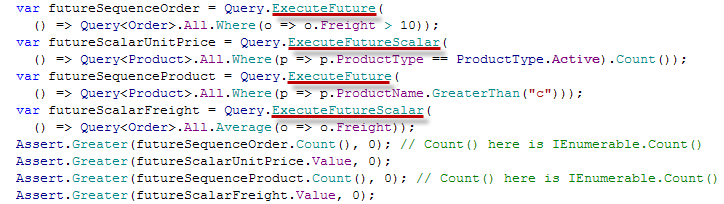 So this will be available in v4.0.6. Btw, have you noticed all future queries are compiled ones? :) 4. Object versionsAs many of you know, DataObjects.Net v1.X-3.X were exposing "unified" Id and VersionId properties. First one was playing a role of "unified" key (Int64), and the second one - of "unified" version (Int32). And this approach worked - of course, if custom key or version were not necessary. DataObjects.Net v4.0 provides new Key concept: - Key structure is defined on the root type of each hierarchy. Or, better, hierarchy is defined by its root type, and such a root type must explicitly define key structure for the whole hierarchy. HierarchyInfo, TypeInfo and KeyInfo types from Xtensive.Storage.Model describe these concepts in runtime.
- Any Entity exposes Key property of Key type. Persistent properties composing the key are exposed as well; we require them to be read-only.
- Key is assigned to each Entity when it is created, and further it can not be changed. By default we provide two protected constructors for each Entity allowing to assign either manually specified key, or automatically generated key. Both ways can be used together - you must simply provide two or more constructors. Moreover, we provide secure API allowing to create an entity of any type with manually specified key (PersistentAccessor).
- You can extract key value (Tuple) from each Key by its Value property
- Key can be created by defining its value (Tuple) and TypeInfo using Key.Create methods
- Keys can be compared for equality. And this is really fast: they cache hash code; moreover, if hierarchy includes more than one type, we maintain identity map for its keys (actually, there is global LRU cache) to ensure we track known entity types for each key. Thus key comparison for such hierarchies is actually handled as reference comparison.
- Keys can be resolved via Query.Single* methods
- Keys can be used in LINQ queries (compared, passed as parameters and so on)
- Keys can be converted to and from string represenation. Key.Format and Key.Parse methods handle this.
- You can declare persistent properties of Key type. Such fields are stored as strings in the storage; on the other hand, they allow to reference any perisstent type.
So as you see, we provide absolutely the same features as before, but for keys of arbitrary types! This is achieved by providing our own unifying adapter ( Key) for any of such arbitrary keys. I think it is one of important advantages provided by our framework: you can deal with keys without explicitly binding your code to their actual types (queries, comparison and so on). And we know currently only few frameworks implement the same concept. - NHibernate does not provide any similar concept.
- ADO.NET Entity Framework provides similar EntityKey type.
Ok, that was a story about Key. But how this is related to object versions? Actually... We have implemented versions by almost identical fashion! Take a look at this beauty: - Entity.GetVersion method returning VersionInfo type provides access to unified version (current, actual or original).
- Version is declared by the same way as Key: just mark some persistent property (or properties) by [Version] attribute. If you mark nothing, we consider version is formed from all the fields except lazy load fields. If hierarchy contains multiple types, it's possible that we won't be able to build version because some non lazy load fields declared in descendants aren't loaded. An exception is thrown on attempt to get version of such an instance (i.e. you must ensure every field participating in version is loaded before it is accessed).
- VersionInfo objects (actually, structs) can be compared for equality. If you do this repeatedly, this is fast: they cache hash codes.
- You can build VersionInfo from Tuple, and vice versa.
- Query.Get/CheckVersions methods allow to get/check the stored versions of specified entities. They rely on future queries & batching, thus their involvement makes updates with optimistic version checks ~ 2 times slower than regular ones. Taking into account the fact that our regular updates are ~ 1.5 times faster than almost everywhere else, this is very good result ;)
- EntityState now have an additional flag (IsStale) indicating if it is stale or not. Stale EntityState implies an optimistic version check must be performed when it is persisted to the storage.
That's it. Obviously, we're planning to use this everywhere: this part of the framework will be used by global caches and sync as well. 5. Prefetch (eager loading) APIThis part is in "deep development" now, so I can provide only rough information. We expect it will be more or less complete in the middle of September. All the API based on several overloads of IQueryable.Prefetch extension method. Prefetch API is fully based on expressions, so there are no any text-based prefetch paths. Finally, it will be possible to choose eager load mode for a particular prefetch path: - Joins (no additional queries, but likely, huge client-server traffic)
- Joins + future queries (smallest traffic, higher load on RDBMS)
- Future queries (small traffic, but more additional queries)
6. LockingLocking closes one of the gaps we had: there were no Lock-like methods. Now this part is implemented ideally: there is a group of IQueryable.Lock extension methods allowing to specify: - LockMode: Shared, Update or Exclusive
- LockBehavior: Wait, ThrowIfLocked, Skip.
This part will be fully working in today's nightly build, so v4.0.6 will include this as well. 7. Oracle supportThis looks a bit fully, but... Its provider made us to implement much more specific adjustments for it in comparison to e.g. PostgreSQL. The worst thing is that it does not allow to perform a correlated subquery when a nested subquery references a column from a table referred to a parent statement any number of levels above the subquery; instead, it allow to reference a column from table referred by a parent statement only. More precise description of this "feature" can be found here. Funny, but they specially disabled it - such queries worked well in 10g Release 1 (10.1), but later Oracle developers disabled this. Frankly speaking, I don't remember anyone else doing something similar - presence of this feature lead to no any disadvantages! I'm curious, do they really think all the queries sent to Oracle are written & optimized by humans?Anyway, now about 150 out of ~ 1000 tests fail on Oracle, and this happens mainly because of mentioned issue. Everything else seems working. If we'll be able to workaround this issue in the nearest days, you will be able to see Oracle provider in v4.0.7. At this moment my brief description of our short-term plans is finished. I hope you like the direction and speed we maintain.
In this post I'll describe statement batching techniques used in DataObjects.Net. I'll describe a bit more than we already have - to give you a full picture of what you must find in the nearest update. So what batching is? Batching is a way of reducing chattiness between RDBMS and its client. Normally client sends each command individually - DbCommand.Execute and similar methods are designed to return a single result immediately; moreover, DbConnection is not thread safe object. So there are some issues. Let's think what can be done to approach them. 1. ADO.NET batching supportNote: we don't use this approach in DO4. I'm describe it here to provide full overview of possible approaches.ADO.NET has built-in batching support, but currently this feature is exposed only as feature of SqlDataAdapter and OracleDataAdapter. Its underlying implementation is actually generic, but as it frequently happens with Microsoft, it is not exposed as public part of API. On the other hand, there are workarounds allowing to utilize it. ADO.NET batching is implemented on communication protocol level: you shouldn't modify command text (e.g. set unique parameter names) to utilize it. Its another important advantage is possibility to get DML exacution result with ease. Its main disadvantages are: - You must use either internal API ( SqlCommandSet class), or rely on SqlDataAdapter (must be slower; moreover, you lose all the genericity with it) - Currently this works only with SQL Server. The same should work for Oracle as well, but it appears no one has tried to even test similar part of its internal API. Finally, this approach ensures the sequence of commands executed on SQL Server will be exactly the same, since ADO.NET batching is implemented on protocol level, and this implies few other consequences: - SQL Server won't try to reuse cached plan for the whole batch. Because there is simply no "whole batch". So it appears this approach is better, if we constantly send different batches: SQL Server is simply upable to reuse the plan in this case. Likely, this was very important until appearance of SQL Server 2005: it caches plans both for batches and individual statements there. - On the other hand, it is worse when we constantly send very similar batches: although SQL Server could re-use their plans, it can't, because there are no real batches. - There is a little bit of extra cost in the server per-RPC execution in this case. If you're interested in further details, refer to: - Good description of ADO.NET batching from ADO.NET team (rather old - May 2005) - Plan caching in SQL Server 20082. Manual batching supportThat's actually the most obvious solution: combine multiple SQL statements into a single command. DO4 currently relies on this approach. Its main advantage is compatibility with most of databases. Probably, there are others (e.g. faster command processing because of plan caching for the whole batch), but they're very database dependent. Our current tests for SQL Server shows significantly better results in comparison to ADO.NET batching; on the other hand, these tests are ideal for batch plan caching. So further we'll work on more realistic tests related to this part. Here are typical DataObjects.Net batch requests (SQL was beautified with a tool):   This way is a bit more complex for implementation: - You must be able to build each individual statement in the batch quickly. Taking into account parameter names must be unique there, this becomes a bit tricky. In our case this part is handled solely by SQL DOM: it implements caching of generated SQL for DOM branches, so in fact only first compilation of each SQL DOM request model is complex (actually it is pretty cheap anyway), but subsequent compilations of request with minor modifications of its model are extremally fast. - You must decide how to deal with errors. I'll describe how we deal with them in further posts. - Some databases (e.g. Oracle) require special constructions to be used for batches ("BEGIN" ... "END"). - If you batch not just CUD statements, everything becomes even more complex: although you can access each subsequent query result with DbDataReader.NextResult method, you must decide how to pass it to the code requiring it. In our case this makes everything more complex, since we initially relied on MARS, but in this case you can use MARS for the last batch query result only (others must be processed prior to it). Generalized batchingUntil now we were discussion just CUD (create, update, delete) sequence batching. Some of ORM tools on the market implement it replying either on the first (NHibernate) or on the second (DataObjects.Net) approach. But is this all where the batching can be used? No. Let's start from very simple example: var customer1 = new Customer() {...}var customer2 = new Customer() {...}foreach (var entity in Query.All.Where(...)) ...As you see, there are two CUD operations and a single query. And all these operations can be executed as a single batch. But AFAIK, none of ORM tools implements even this simple case. Why? Actually, because their API makes this not so obvious for ORM developers: - Normally there is a method flushing all cached changes. In case with DataObjects.Net this method is Session.Persist(). - This method guarantees all the changes are flushed on its successfull completion. - Query API relies on such method to ensure all the changes are flushed before query execution. As you see, such a logic makes this really less obvious: persist and query APIs are completely different, although in this case they must be partially intagrated. Let's think how this could be performed on better API: - Session.Persist(PersistOption.QueueOnly) ensures all the current changes are queued in low-level persist/query pipeline. - This method is called before execution of any query. - When query is executed, it is actually appended as the last statement in the last queued batch, if this is possible. So Session.Persist(PersistOption.QueueOnly) completion means ORM framework has promised to persist all the changes before the next query (or transaction commit), instead of actual guarantee all the changes are already persisted. That's what generalized batching is: batch everything that is possible to batch, but not just CUD operations.It's interesting to calculate the effect of generalized batching from the point of chattines (number of network roundtrips): - No batching: 1 (open transaction) + CudOperationCount + QueryCount + 1 (commit). - CUD batching: 1 (open transaction) + Cud BatchCount (~= CudOperationCount/3...25) + QueryCount + 1 (commit). - Generalized batching: 1 (open transaction) + SeparateCudBatchCount (~= 0!) + QueryCount + 1 (commit).Huge effect. * SeparateCudBatchCount is count of CUD batch parts without queries. Since batch size is limited, they'll appear when the number of CUD operations between queries is large enough (~ >25). Likely, it will be close to zero in most of real life cases.Generalized batching and transaction boundariesAs you see, it's possible to eliminate at least one more database roundtrip: opening a transaction. In fact, this command could be send as part of the first batch. Initially this looks attractive... On the other hand, this makes impossible to use DbTransaction objects, as well as intagrate with System.Transactions. Moreover, duration of a single transaction is normally at least ~ 1/100...200 of second, although single network roundtrip is ~ 1/10000 of second. So it looks like it's better to forget about this optimization.Generalized batching and future queriesSome ORM frameworks implement future queries (e.g. NHibernate): - When future query is sceduled for execution, ORM guarants it will be executed later, and will ensure its result will be available on attempt to get it (enumerate it or get its scalar value). - This allows ORM to execute such a query as part of a single batch containing other similar queries. So there will be single netowork roundtrip instead of multiple ones. Future queries can be integrated with generalized batching very well. Let's look on content of typical batch in this case. There will be: - Optionally, CUD operations - Optionally, future queries - Query that lead to batch execution (either future query or a regular one). And the total count of roundtrips is: - Generalized batching w. future queries: 1 (open transaction) + SeparateCudBatchCount (~= 0!) + NonFutureQueryCount + 1 (commit).But which queries can normally be executed as future ones? In general, all the queries that aren't "separated" by CUD operations can be executed as future queries!So if you're mainly reading the data, future queries are right for you. Generalized batching makes them quite useful in data modification scenarios as well. Parallel batch execution
Earlier you've seen I proposed to use Session.Persist(PersistOption.QueueOnly) - it ensures all the current changes are queued in low-level persist/query pipeline. Obviously, it may not just prepare the batches for later execution, but start a background thread execution "completed" batches from this queue as well. E.g. if we created 110 objects, and batch size is 25, invocation of this method must lead to creation of 5 batches. First 4 of them must be completed, but the last one containing 10 statements is not. If parallel batch execution is implemented, we'll start to execute first batch from our queue in background immediately; and later - the next ones. Obviously, this implies lots of complexities. Some of them are: - Synchronization on queue and underlying DbConnection - Careful error reporting: if error occurs during background batch processing, we must ensure it will be passed to the user thread. On the other hand, all of them can be resolved. Main benefit of this approach is that user thread won't wait while its changes are persisted. It can work to produce the next batch. And I think this is important: this may significantly reduce the duration of transactions in bulk operations. As you know, presence of ORM makes them noticeable longer (e.g. without this feature a time we spend on building the batches increases it; but if they're executed in parallel, we simply "flood" database with the job). Parallel batch execution in combination with generalized batching must bring nearly the performance of SqlBulkCopy to ORM based solutions. Hopefully, I'll be able to prove this on tests further. I'm pretty optimistics here, since v4.0.5 with its CUD-only batching seems to be just 1.5 times slower than SqlBulkCopy. Autmoatic background flushes
Currently DataObjects.Net automatically calls Session.Persist() when the number of modified, but not persisted objects becomes greater than 500. We'll replace this to Session.Persist(PersistOption.QueueOnly), and likely, will decrease the flush limit to ~ 100-200.
So in general it won't be necessary to manually call Session.Persist at all. Automatic background flushes will be a default feature.
Batching in DataObjects.NetAs I've mentioned, publicly available v4.0.5 implements just CUD sequence batching by manually composing the commands of multiple statements. This works pretty well - tests approve this (I'm showing the results here, since we decided to do not publish DataObjects.Net scores @ ORMBattle.NET until it will be accepted by the people): DataObjects.Net (batch size is 25): Create Multiple: 20105 op/s Update Multiple: 35018 op/s Remove Multiple: 42542 op/s NHibernate (ADO.NET batching is on, batch size is 25): Create Multiple: 12617 op/s Update Multiple: 17148 op/s Remove Multiple: 18510 op/s Now we're working on everything else described in this post. I hope to show a complete solution till the middle of September. Such a solution for DataObjects.Net is even more attractive: as you know, it is designed to completely abstract the database. I'd like to mention just one example where such bulk operation performance must be necessary: we have a generic schema upgrade API. Renaming and copying of fields and classes are among its very base features; in the end of all you can implement custom upgrade. And we did all to allow you to use the same ORM API even here: we expose old structures as "recycled" persistent types accessible during a special Domain.Build phase along with new ones, so you can copy/transform their data using the same way as if you'd do this in runtime, and thus keeping your upgrade routines fully database independent. And as we know in practice, performance here is of huge importance. ORM performance: what's next?Next time I'll discuss materialization in DataObjects.Net - we really did a lot to compete well with materialization of simple entities in other frameworks (EF). Finally, I'll describe what you can expect from us further: parallelized materialization.
Check it out: http://ormbattle.netORMBattle.NET is devoted to direct ORM comparison. We compare quality of essential features of well-known ORM products for .NET framework, so this web site might help you to: - Compare the performance of your own solution (based on a particular ORM listed here) with peak its performance that can be reached on this ORM, and thus, likely, to improve it.
- Choose the ORM for your next project taking its performance and LINQ implementation quality into account.
The story behind ORMBattle.NET is published here. P.S. DataObjects.Net v4.0.5, which is tested there, is the most current version we have. It will be released tomorrow or the day after - along with official launch of ORMBattle.NET.
We've just adopted our CrudTest for NHibernate. First results: DO4 (LINQ):Insert: 28,617 K/s. Update: 34,111 K/s. Fetch & GetField: 8,682 K/s. Query: 1,486 K/s.CachedQuery: 8,176 K/s.Materialize: 358,671 K/s.Remove: 41,108 K/s. NHibernate (LINQ):Insert: 12,936 K/s. Update: 12,939 K/s. Fetch & GetField: 7,152 K/s. Query: 95,7/s.CachedQuery: Cached queries are not supported in NH yet.Materialize: 37,892 K/s.Remove: 13,012 K/s The highlighted numbers show ~ 10 times difference, although DO wins in all other cases as well. Results of this test for several other ORMs are upcoming, the project will be shared @ Google Code. In addition, we're developing general LINQ test as well. For now LINQ for NHibernate passes ~ 25 tests out of 100. This mean only very basic LINQ stuff really works on this release. DO4 passes ~ 98 tests there (it still misses passing arrays/collections as query parameters). P.S. The optimization we've made during last 2 weeks is already quite successful (although we still work on materialization performance). Pre-optimization results can be found here.
Since there is a vacations season, last weeks we've been working mainly on performance (I promised we'll spend some time on this some day). And I'm glad to announce we've reached almost invincible level: - We beat plain SqlClient on insertion test by about 15%. Seems almost impossible, yes? Well, but this is the effect of our batching implementation. Later I'll uncover all the details. - Update test is also quite close to SqlClient mark. - Materialization is one more area where we've got really good progress. No any exact numbers here, since we're working on it now. The new, ultra high-speed DO bolide will be shown by the end of this week.
|
|



