News, examples, tips, ideas and plans.
Thoughts around ORM, .NET and SQL databases.

Showing posts with label licensing. Show all posts

Tuesday, August 21, 2012

Moving towards openness

Remember the days when every website wanted to maintain its own database of users and related data? To download some restricted content you have to register there, provide a password, successfully forget it after a couple of minutes and use "Restore password" feature every time you visit the website later.

The same kind of website was our corporate X-tensive.com website. Moreover, our support website was configured to work with users from x-tensive.com only. Until...

Until we rejected the model above and switched to OpenID authentication scheme and made all versions of DataObjects.Net available for download without registration. The same change was applied to support.x-tensive.com — now anyone who has OpenID may log in and post an issue/feedback.


Having that done, we closing user registration area on x-tensive.com as now it doesn't have any sense, however, all user accounts will be preserved and users may sign in in their x-tensive.com profile as usual.

Note for owners of DataObjects.Net licenses: we launched new customer area, don't miss it. All your license-related data is migrated from x-tensive.com to get.dataobjects.net website.

Saturday, August 11, 2012

9-th anniversary, new prices, community edition and much more

Hello everybody!

Today we are celebrating the fact that 9 years ago the first version of the award-winning, revolutionary ORM named DataObjects.Net was released. Due to this we are launching our new edition & pricing policy, new customer area and we are hoping that you'll like it.

DataObjects.Net 4.5.4 final

The main change in this version in addition to all listed in RC 1 & RC 2 is Community edition support. Download it from official website or from NuGet repository.

Community edition

Many users requested Community Edition of DataObjects.Net with full set of features and with possible limitation of number of persistent types. Well, here it is, the Community edition is rolled out today. It has the following characteristics:
  • The edition is absolutely free.
  • Anyone can obtain it from our website.
  • It contains 2 hardware licenses (means it can be installed onto 2 workstations at once).
  • Number of persistent types is limited to 20.
  • The license is issued for 1 year as regular licenses.
Obtain Community edition.

Professional edition

Professional edition is available for $150 and includes 2 hardware licenses. Comparing to the previous pricing scheme (500 euro), the price cutting is more than 65%. Moreover, 3 items are available for $120 each and 5 items - just for $100.

Get Professional edition.

Ultimate edition

Ultimate edition also gets its new shiny price, from now it is available only for $1500 instead of 2500 euros. The edition provides the unlimited number of hardware licenses. Ultimate edition contains access to the source code no more.

Get Ultimate edition.

Access to source code

We extracted 'Access to source code' feature to a separate package to make it available to all our customers, not only for Ultimate edition owners as it was earlier. So anyone, even an owner of Community edition has a chance to dive deep in DataObjects.Net white and black magic. The price for the package is set to $500. The source code is available in download area of our website.

Get access to source code.

New customer area

We are inviting you to the new customer area that we have built for you for better and easier license management. No more registration, we migrated to OpenID authentication scheme. We added license sharing feature, so your developers won't bother you with anything concerning licenses and hardware locks, you may share the license with all of them.

The area can be accesses by clicking on 'My Account' link in the main menu:


Soon you'll receive our invitation e-mail. We need you to log in the area to get your licenses associated with your account. Don't forget to periodically check your mailboxes!

Join the celebration! Thank you!

Links:


Monday, April 23, 2012

DataObjects.Net 4.5.1 RC

DataObjects.Net 4.5.1 Release Candidate is available.

This update includes features that we didn't have time to implement in 4.5.0 as well as bug fixes.
Installer and .zip can be downloaded here.

NuGet packaging

DataObjects.Net got official NuGet packages.

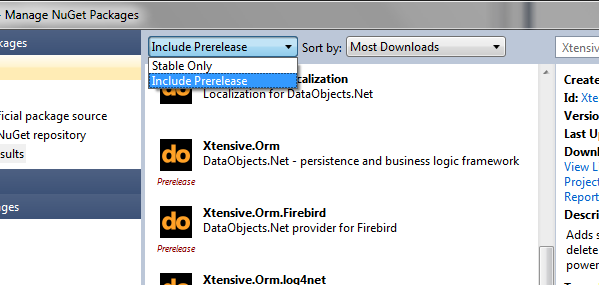
Currently they are pre-release in terms of NuGet packaging. This means they won't be shown by default. To install such package you'll need to change default package filter:


To get main library (Xtensive.Orm) you'll to need install Xtensive.Orm package from package browser. Or if you prefer to use package manager console:


 PM> Install-Package Xtensive.Orm -IncludePrerelease


Each storage provider has its own package, that depends on main library.
Here are the names of all available packages:
  • Xtensive.Orm - main library
  • Xtensive.Orm.Firebird - provider for Firebird (incorrect dependency, temporary removed from listing)
  • Xtensive.Orm.MySql - provider for MySQL
  • Xtensive.Orm.SqlServerCe - provider SQL Server Compact (3.5 only)
  • Xtensive.Orm.Oracle - provider for Oracle
  • Xtensive.Orm.log4net - logging provider for log4net
For most packages all dependencies will be installed from NuGet automatically, exceptions are SQL Server Compact and Oracle providers. PostgreSQL provider currently is not available due to old assembly version of Npgsql library in corresponding package. This is to be solved in future updates.

Portable mode for license manager

License manager now supports so-called "portable" mode.

By default license manager stores license files in %ALLUSERSPROFILE%\DataObjects.Net folder.
For recent Windows versions it is typically C:\ProgramData\DataObjects.Net.

Sometimes it is desirable to have license files somewhere relative to your sources. Now such layout could be accomplished with ease.

Suppose you have DataObjects.Net in a subfolder of your project. For example let's say you have DO.Net in C:\Projects\MyProject\Libraries\DO.Net.

To activate portable mode you need to create folder with name Licenses on the same level as Tools and Libs and DataObjects.Net.targets. So in our example it should be C:\Projects\MyProject\Libraries\DO.Net\Licenses.

After this folder is created license manager will automatically read and write licenses in that folder.

No hardware licenses for Ultimate customers

Previous versions of DO.Net required you to have hardware license key for each computer. But if you have Ultimate subscription you are allowed to run it on unlimited number of machines. Hardware license key is however still were required.

This is no longer the case since 4.5.1. If you have valid license key for Ultimate edition no hardware license key is required. Just install company license key and you are ready to rock with DO.Net.

Bug fixes

  • Fixed complex indexes extraction in Oracle provider
  • Fixed translation of TimeSpan.Ticks property for Oracle and PostgreSQL
  • Correctly install templates for non-English Visual Studio

Migration path

This is minor update, no source code changes or recompilation required.
Installer will automatically uninstall any existing DataObjects.Net 4.5.x.
If you want to play with 4.5.1 RC and keep your 4.5.0 installation it's better to use .zip package instead.

Wednesday, August 17, 2011

Update of licensing component in DataObjects.Net 4.5 Beta 4

As you might remember, a year ago DataObjects.Net changed its license and become proprietary. In order to protect the product from being stolen we decided to use Eziriz .NET Reactor library, which fitted rather well to DataObjects.Net distribution model (trial mode → purchase → simple activation via internet). And it seemed smooth and efficient until one nuisance was discovered.

.NET Reactor operates with so-called Hardware Id (HWID) which can be calculated from identifiers of four hardware components: processor, motherboard, network card & hard disk drive. We had decided to choose the first three and unfortunately that was rather short-sighted decision because (it was found out later), .NET Reactor takes into account all network cards, even virtual, so when a DataObjects.Net customer plugged-in his mobile phone or opened a VPN connection, a new network interface appeared, HWID changed and therefore, valid DataObjects.Net license suddenly became invalid.

To sort out the problem we are changing the implementation of licensing scheme in DataObjects.Net 4.5 - network cards identifiers will be taken into account no more. As a result of the algorithm alteration, HWID will change and this will require 2 simple actions: revoking previous HWID license and activating the new one. We understand that this might be a noticeable inconvenience, that's why the measure is applied only to the upcoming version while DataObjects.Net 4.4 stays untouched.

For users of DataObjects.Net 4.4 who regularly face with HWID changes, I recommend the following path:
  • make a backup of your %DataObjects.Net directory%
  • download DataObjects.Net 4.5 Beta 4
  • take Xtensive.LicenseManager.dll & Xtensive.Aspects.Weaver.dll from there and replace the corresponding files in %DataObjects.Net directory%\Bin\Latest, %DataObjects.Net directory%\Bin\Debug & %DataObjects.Net directory%\Bin\Release folders.
Here is how the process of hardware license update looks like:
 1. When using the licensing component from DataObjects.Net 4.5 you might see the following screen:


Note that License Manager will show you the new HWID, which is calculated without data about network cards. This HWID is not yet activated. If you have Ultimate license, go directly to the step 4.

2. Open Explorer and point it to C:\ProgramData\DataObjects.Net folder. Usually this folder stores primary (or company) license (DataObjects.Net.license file) and the hardware one (XXXX-XXXX-XXXX-XXXX-XXXX.hwl file).


Here "3CA3-0442-7A86-4820-423A.hwl" is the file with my previous hardware license. So open your browser and go to My Subscriptions to revoke the old hardware license.

 3. Revoke the outdated hardware license. As you have upgraded to DataObjects.Net 4.5, you wouldn't need the hardware license from the previous version.


4. In License Manager click "Install License...".


Note that primary (company) license is still valid and doesn't require any changes. Choose "Hardware key activation: Internet" and voilĂ , activation is successful.


DataObjects.Net 4.5 Beta 4 is available for download on the website.

Monday, September 20, 2010

DataObjects.Net source code repository is open for owners of Ultimate Edition license

I'm glad to announce we've finally completed migration of our primary source repository to BitBucket.org:


The repository URL is http://hg.x-tensive.com/dataobjects.net (use HTTPS for checkouts).

The repository is private, i.e. you can access it only if you have a permission. If you're owner of Ultimate Edition license (or have any other agreement with our company enabling you to access the repository), please register at BitBucket.org and send us e-mail with the name of your BitBucket account to get the permission.

Note that currently you won't be able to build DataObjects.Net from the source code stored there - you need a license to proprietary .NET Reactor and PostSharp to do this (i.e. more precisely, you can build it, but you need these two additional licenses). But it's quite likely we'll eliminate the need to have at least .NET Reactor license further (i.e. it will be possible to build unprotected builds solely for debug purposes).

Tuesday, August 03, 2010

How to activate DataObjects.Net license

Our license activation process isn't absolutely intuitive so far, so unfortunately, I should write this shameful post :)

Imagine you already ordered a license or prolonged it. You must:
  • Login to X-tensive.com with your own account.
  • Activate your licenses by clicking on links in e-mails we've sent to you ("Thank you for purchasing our product. To register it, follow the instructions below: ...").
  • Go to Profile\My Subscriptions page at X-tensive.com
  • Download your company license there


  • Run License Manager (Start Menu\DataObjects.Net\Tools)
  • Install company license by copy-pasting its content.
  • Activate Hardware License for it it via Internet - by clicking on corresponding button there. 
  • If this is impossible (e.g. there is no Internet connection), you can activate Hardware License manually. You must visit Profile\My Subscriptions page again, click on "Manage hardware licenses" and register your HWID there. Your hardware license bound to this HWID will be generated, so you should copy-paste it again. Your HWID is displayed by License Manager.

Thursday, July 15, 2010

New DataObjects.Net order pages

According to announced pricing model, the following DataObjects.Net editions and prices are valid from today:


Links to order pages:
Upgrade subscription prolongation:
  • For Professional and Ultimate Editions: order your primary license and necessary amount of hardware licenses with "DOUPGRADE2" coupon code (70% discount).
  • For Basic and Standard Editions: order your primary license and necessary amount of hardware licenses with "DOUPGRADE1" coupon code (60% discount).
Other remarks:
  • You should order one Primary License, and, optionally, any number of additional Hardware Licenses. Any Primary License already includes 3 prepaid Hardware Licenses in accordance with above table.
  • All the order pages are secure.
  • We provide 45-day money back guarantee.
  • If earlier you already purchased any of our products, enter ''CUSTOMER" coupon code at the order page to get 15% discount for your new license. The discount is provided for Professional and Ultimate Editions of product, as well as for its hardware licenses.
License page will be updated in accordance with this information shortly.

Monday, May 24, 2010

DataObjects.Net editions and prices: upcoming changes

Update: final pricing model is already announced.

The following map defines new pricing model we're going to introduce in June\July:


We tried to develop a model with good balance between several factors:
  • Our base prices must be comparable with key competitors; but final per-developer price must be lower.
  • The model should be explicitely designed to maximize the price of each purchase; but options we offer should be anyway be more attractive from the point of full price in comparison to competitors.
  • Since we're going to explicitly check hardware (HW) licenses, number of prepaid licenses must be determined basing on fact we provide 2 or 3 HW licenses for each developer: two for office and home PCs and one more - for CI/testing agent, if it is a team pack.
  • There should be a cheap option for companies or persons that would like to try a product in action, or currently have just a single project where it can be used.
Licenses of existing customers will be upgraded by the following rules:
  • Current Enterprise license will be upgraded to Ultmate edition;
  • Current Personal license will be upgraded to Solo Professional edition;
  • Any other license will be upgraded to Professional edition.
So most part of existing customers (owning SMB licenses) won't loose neither features, nor money (on yearly subscription prolongations). Since downgrades are free, customers with e.g. Internal license might decide to switch to a cheaper option later.

Any comments are welcome. This isn't final version, so your comments may affect on its final look.