News, examples, tips, ideas and plans.
Thoughts around ORM, .NET and SQL databases.

Monday, February 27, 2012

DataObjects.Net 4.4.2 goes final

Today, 27-th of February, 2012 we are releasing DataObjects.Net 4.4.2.

This is recommended update for all who use previous version of DataObjects.Net. The major change in this release is migration to the latest version of PostSharp which significantly shortens compilation time. Moreover, this version also contains several bugfixes and improvements.

In addition, we are releasing 4.3.9 version. Eventually we are dropping support for DataObjects.Net 4.3 and this release will be the last major update in 4.3.x branch.

List of changes

Changes in this release in comparison with 4.4.1 are described in details in the previous posts:

Migration path

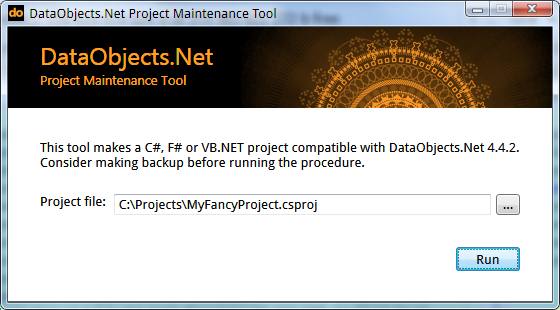
Note: If a previous version of DataObjects.Net was installed (via installer), uninstall it and install the current version of DataObjects.Net. The easiest and recommended way is to utilize our ProjectUpgrader tool which resides in %DataObjectsInstallationPath%\Common\ProjectUpgrader directory. Select a project and hit "Run".


However, you may also try to update the project file manually. To do that, update references to the latest DataObjects.Net components as well as to PostSharp library.

When it is done, the project should reference Xtensive.Aspects.dll, Xtensive.Core.dll, Xtensive.Orm.dll version 4.4.2.0 and PostSharp.dll version 2.1.0.0

Where to download

DataObjects.Net 4.4.2 RC 2 is published and can be downloaded from the download area.

Future plans

We are hardly working on the upcoming DataObjects.Net 4.5 version which is almost ready except minor parts. Its current state can be described as a stable beta, so the first 4.5 RC will be published soon.

Friday, February 24, 2012

DataObjects.Net 4.4.2 RC 3 is out

Today we are releasing DataObjects.Net 4.4.2 RC 3. It contains several minor fixes in comparison with the previous release.

List of changes

  • Fixed: NullReferenceException occured in BatchingCommandProcessor under certain rare conditions.
  • Fixed: "ORDER BY" clause appeared in unacceptable positions in generated SQL under certain conditions

Migration path

Migration path from version 4.4.1 or earlier is described in the previous post.

Download

DataObjects.Net 4.4.2 RC 3 can be downloaded from the download area.

Plans

Likely, DataObjects.Net 4.4.2 Final will be released next week.

Thursday, February 09, 2012

DataObjects.Net 4.4.2 RC 2 is published

Today we are releasing DataObjects.Net 4.4.2 RC 2. The main advantage of DataObjects.Net v4.4.2 branch is migration to the latest version of PostSharp library (v2.1) that significantly improves compilation speed.

List of changes comparing to DataObjects.Net 4.4.2 RC 1:

Migration path

Note: If a previous version of DataObjects.Net was installed (via installer), uninstall it and install the current version of DataObjects.Net. The easiest and recommended way is to utilize our ProjectUpgrader tool which resides in %DataObjectsInstallationPath%\Common\ProjectUpgrader directory. Select a project and hit "Run" and that's it.
However, you may also try to update the project file manually. To do that, update references to the latest DataObjects.Net components as well as to PostSharp library. When it is done, the project should reference Xtensive.Aspects.dll, Xtensive.Core.dll, Xtensive.Orm.dll version 4.4.2.0 and PostSharp.dll version 2.1.0.0

Where to download

DataObjects.Net 4.4.2 RC 2 is published and can be downloaded from the download area.

Wednesday, January 11, 2012

DataObjects.Net Extensions, part 2. Reprocessible tasks

This is the second part of the series of posts about DataObjects.Net Extensions, created and maintained by Alexander Ovchinnikov, the author of LINQPad provider for DataObjects.Net.
The first part was about batch server-side update and delete operations and this one is dedicated to reprocessible operations support.

Reprocessible operations

In multi-threaded environment, especially under high load there are pretty good chances of deadlocks, update conflicts, unique constraint violations, etc. Obviously, such cases must be correctly handled and this is where reprocessible tasks take up the challenge.

Which tasks are reprocessable?
  1. Reprocessible task should represent an autonomous block of logic, usually a single method or a delegate so it potentially could be executed as many times as needed in case of failure.

  2. Reprocessible task must be transactional, so it shouldn't change the state of the system unless it is successfully completed. Moreover, it shouldn't spoil outermost transaction if any.

  3. Reprocessible task should be smart enough to join active session (if present) or initialize its own one.
A simple reprocessible task might look like this:
Domain.Execute(session =>
  {
    // Task logic
  });
Note Action<Session> argument. This is required to have the ability to join current Session or open a new one. However, this sort of declaration doesn't provide any way to manage conditions of reproccesibility and the transaction isolation level to follow. Overloads of the Domain.Execute extension method with full list of arguments provide such options:
void Execute(IsolationLevel isolationLevel, 
             IExecuteActionStrategy strategy, 
             Action<Session> action);

T Execute<T>(IsolationLevel isolationLevel,
             IExecuteActionStrategy strategy,
             Func<Session, T> action);
An implementor of IExecuteActionStrategy is capable of how to react to exceptions thrown, how many attempts to execute the task to make and so on.

Task execution strategies

There are dozens of ways how to execute the tasks, that's why the strategy is an interface; you may want to implement your own strategy for some specific scenarios. However, DataObjects.Net Extensions contains several ready-to-use strategies for the most common cases:
  1. HandleReprocessableExceptionStrategy
  2. HandleUniqueConstraintViolationStrategy
  3. NoReprocessStrategy

HandleReprocessableExceptionStrategy

The strategy is used to handle any ReprocessibleException, which in turn is a erroneous situation that can be recovered by rolling back active transaction and reprocessing all actions in a new one. This strategy is applicable for the majority of scenarios and is recommended as a default one.
Domain.Execute(
    ExecuteActionStrategy.Reprocessable,
    session =>
        { 
            // do some stuff
        });
The default instance of HandleReprocessableExceptionStrategy can be accessed via ExecuteActionStrategy.Reprocessable static property. Default number of attempts is 5.

HandleUniqueConstraintViolationStrategy

The strategy is used to handle either ReprocessibleException or UniqueConstraintViolationException as latter one doesn't inherit ReprocessibleException. The strategy extends HandleReprocessableExceptionStrategy and might be especially helpful in scenarios "Add or Update entity".
Domain.Execute(
    ExecuteActionStrategy.UniqueConstraintViolation,
    session =>
        { 
            var counter = session.Query.SingleOrDefault<Counter>(ID);
            if (counter == null) {
                counter = new Counter(session, ID);
            }
            counter.Value++;
        });
The default instance of HandleUniqueConstraintViolationStrategy can be accessed via ExecuteActionStrategy.UniqueConstraintViolation static property. Default number of attempts is 5.

NoReprocessStrategy

This strategy doesn't support reprocessing. It should be used in scenarios where reprocessing is not desirable or might lead to erroneous results, for example, a task operates with non-transactional objects or services:
Domain.Execute(
    ExecuteActionStrategy.NoReprocess,
    session =>
        { 
            // on transaction rollback results of these methods can't be reverted
            SendMail();
            CreateAFile();
            DeleteAFile();
            // database-related actions
        });
The default instance of NoReprocessStrategy can be accessed via ExecuteActionStrategy.NoReprocess static property.

Custom reprocessible strategies

To utilize your own reprocessible strategy, use this pattern:
Domain.Execute(
    new MyFancyReprocessibleStrategy(),
    session =>
        { 
            // some actions
        });
The implementation of custom reprocessible strategy might be based on ExecuteActionStrategy class which is the base class for the above-mentioned strategies and is included into DataObjects.Net Extensions or can be made from scratch.

Enjoy the power of DataObjects.Net Extensions, employ server-side batches and task reprocessing in your projects.


P.S.
How to install the extension is described in the first part.

Thursday, December 29, 2011

DataObjects.Net is migrated to PostSharp 2.1

As it was announced earlier, right after the release of DataObjects.Net 4.4.1 the project was migrated to PostSharp 2.1. According to the PostSharp 2.1 release notes, one of many positive changes of the migration is noticeable compile-time performance boost.

For example, after the migration a DataObjects.Net tests project with hundreds of models is being compiled 2 times faster. I hope you'll notice the same effect. Say thanks to Gael, the author of PostSharp for such a sweet update.

Changes

This version of DataObjects.Net contains all new features and bugfixes from the previous version, the only difference is that the project is migrated from PostSharp 2.0 to PostSharp 2.1.

Migration path

  • If a previous version of DataObjects.Net was installed (I mean through installer), uninstall it and install the current version of DataObjects.Net.
  • In your projects update references to the latest DataObjects.Net components as well as to PostSharp library.
Now your projects should reference Xtensive.Aspects.dll, Xtensive.Core.dll, Xtensive.Orm.dll version 4.4.2 and PostSharp.dll version 2.1.

Where to download

DataObjects.Net 4.4.2 is published as a release candidate and can be downloaded from the download area.

Big Winter Sale

The sale is going to its end, as 2011 year does. So if you are still thinking, these are the last days to lock your savings. Till the end of 2011 year we are offering 50% off. Beyond the great product, you're also gaining 1 year of fast and professional support, new releases, nightly builds and more.

P.S.
This is likely to be the last post in this year.
I'm wishing you a wonderful 2012 year, full of hope and optimism.

Monday, December 19, 2011

DataObjects.Net v.4.3.8 & v.4.4.1 are released

Today, 19th December, 2011 we are announcing the final release of DataObjects.Net 4.3.8 and 4.4.1, available for download on our web site.

Changes in this version are listed in these posts:

What's next?

As it was promised, the next version in 4.3 & 4.4 branches will be migrated to PostSharp 2.1 RTM. All the functionality will be the same, except the version of PostSharp. It is expected that the next version will be ready within a week or two.

Tuesday, December 13, 2011

Setting default values for persistent properties

While DataObjects.Net 4.4.1 & 4.3.8 Final installers are being prepared and tested, here is one more post about one not so well known feature of effective domain modelling and how that feature is extended in the upcoming release.

DataObjects.Net includes a set of rules for defining the default value for a persistent property.
The rules are the following:

Let T is the type of a persistent property, then:

1. T is a primitive type

If T is a primitive type, Guid or String then the default value for the property is default(T) and the type of the underlying column is T.
public class Animal : Entity {
...
[Field]
public int Age { get; set; }

CREATE TABLE Animal (
...
[Age] [int] NOT NULL

2. T is Nullable<>

If T is Nullable<> then the default value is NULL and the type of the underlying column is Nullable T.
public class Animal : Entity {
...
[Field]
public int? Legs { get; set; }

CREATE TABLE Animal (
...
[Legs] [int] NULL

3. T is a reference type

If T is a reference type then the default value is NULL and the type of the underlying column is the type of primary key of the referenced Entity.
public class Animal : Entity {
...
[Field]
public Person Owner { get; set; }

CREATE TABLE Animal (
...
[Owner.Id] [int] NULL

These rules are more or less obvious and straightforward but what if the overwhelming majority of animals in your application universe have 4 legs and you don't want to set this property manually again and again? Or there should not be homeless animals? Then I guess, you should have the opportunity to override these rules.

This can be done with the help of [Field] attribute.

1. Setting default value for a primitive persistent property

public class Animal : Entity {
...
[Field(DefaultValue = 4)]
public int? Legs { get; set; }

CREATE TABLE Animal (
...
[Legs] [int] NULL
...
ALTER TABLE [dbo].[Animal] ADD CONSTRAINT [DF_Animal_Legs]  DEFAULT ((4)) FOR [Legs]

2. Changing nullability of a reference field.

public class Animal : Entity {
...
[Field(Nullable = false)]
public Person Owner { get; set; }

CREATE TABLE Animal (
...
[Owner.Id] [int] NOT NULL
This setting leads to NOT NULL column which means that the value of the property must be set prior to any Session.Persist() call while constructing the Animal entity. Therefore, the right way to set such properties is inside entity's constructor, before executing any queries.

3. Setting default value for a reference persistent property.

Note, this feature is implemented in the upcoming version of DataObjects.Net (by upcoming I mean 4.3.8 or 4.4.1 branches).
public class Animal : Entity {
...
[Field(DefaultValue = 1)]  // 1 here is the key of the default animal owner
public Person Owner { get; set; }

CREATE TABLE Animal (
...
[Owner.Id] [int] NULL
...
ALTER TABLE [dbo].[Animal] ADD CONSTRAINT [DF_Animal_OwnerId]  DEFAULT ((1)) FOR [Owner.Id]
This makes sense in a scenario when the key of the default referenced entity is already known on a compilation step or it is a well-known constant identifier so there is an Entity with that key in the domain.

I hope these little tricks will help you in modelling your domains with even less efforts.

Monday, December 05, 2011

DataObjects.Net 4.3.8 & 4.4.1 Release Candidates 2 are out

DataObjects.Net 4.3.8 RC 2 & 4.4.1 RC 2 are available for download.

This release includes a minor fix in SQL Server & Oracle providers. No special actions for migration to the new version are required except updating the references.

Just as a reminder: the list of fixes, updates and new features is here, the detailed overview of index management-related features is here.

We are waiting for your feedback! Write to support@x-tensive.com.

Thank you!

Thursday, December 01, 2011

Big Winter Sale


We are glad to announce that Big Winter Sale has started on the 1st of December and will last till the end of the year. During this time you get 50% off any edition of DataObjects.Net and Help Server. To apply this 50% special to your order, just enter DEC2011PROMO coupon code at the shopping cart or product checkout page.

Should you have any questions, please email to sales@x-tensive.com.

Sincerely,
Xtensive.com Sales Team

Monday, November 28, 2011

DataObjects.Net 4.3.8 RC 1 & 4.4.1 RC 1 are published

Today DataObjects.Net 4.3.8 RC 1 & DataObjects.Net 4.4.1 RC 1 are published and available for download.

Just as a reminder: the list of fixes, updates and new features is here, the detailed overview of index management-related features is here.

No special actions for migration to the new version are required except updating the references.

We are waiting for your feedback! Write to us to support@x-tensive.com.

Thank you!